




Prospects and assignments

Landman software for brokerages
Your landmen log time, expenses, and receipts against the prospect.
You approve it,
then turn it into the client invoice, all in one place.
10+ years in use on real land work.
Prospects and legal descriptions
Time, expenses, and receipts
Approvals, invoicing, and reporting
From the first prospect to the invoice
Timesheets come by email, receipts come by text, and prospect notes sit in someone's spreadsheet.
Assignments, legal descriptions, hours, and expenses end up in separate files and messages.
You find mistakes after the invoice goes out because there was no easy way to check the week's time first.
Someone has to match receipts to timesheets and rebuild the client invoice from scattered records.
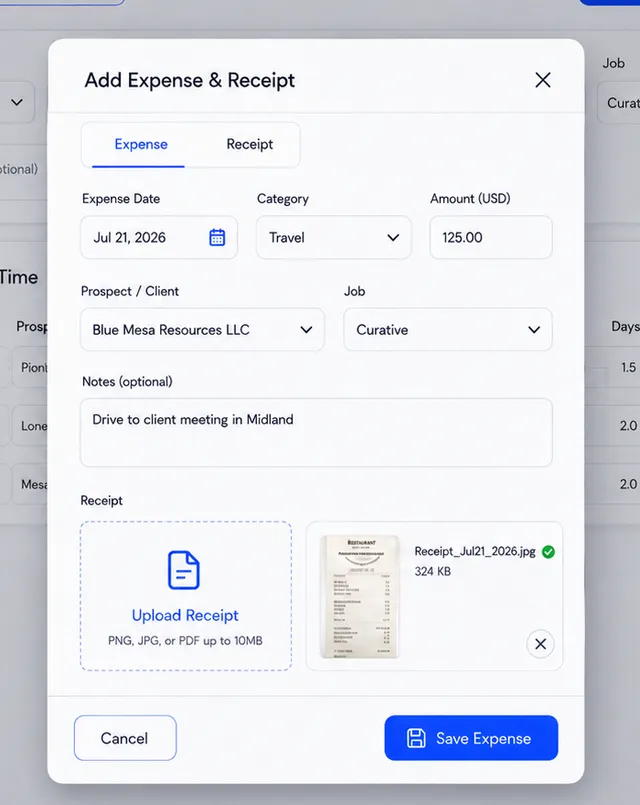
Landmen log their hours and expenses on the prospect they're working. They can snap a photo of each receipt and upload it with the expense.
Each prospect holds its legal description, who's assigned, and every hour and expense logged against it.
Look over submitted time and expenses, send back what's wrong, and approve the rest.
Automated reminders nudge people about missing entries and open items.
❓ How it works
Set up the prospect
Log the work
Approve it, then bill the client
A look inside
Prospects and assignments
Time, expenses, and receipts
Review and approve
Invoices and reports
Sample data
Step 1
Create the prospect, maintain its legal-description details, and assign the responsible landmen or staff.
See prospects and assignmentsStep 2
Landmen log hours and expenses against the prospect. Snap a photo of the receipt and upload it with the expense.
See time and expense trackingStep 3
You or your office manager check and approve entries before billing.
See approvals and reviewStep 4
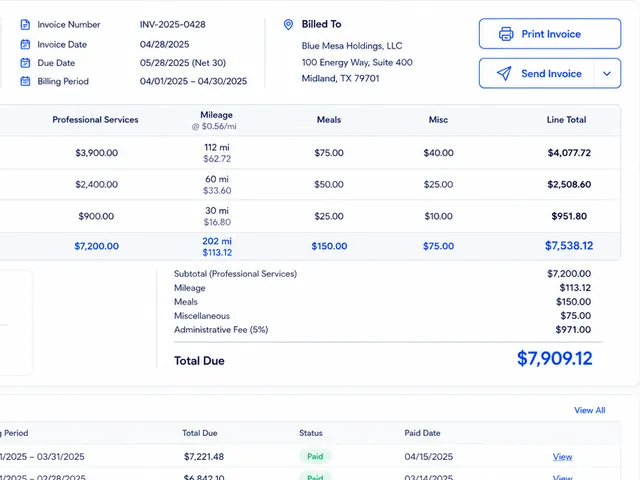
Build the client invoice and report from approved time and expenses. No re-typing.
See invoicing and reportingKnow where every job stands
Keep the work your office needs to review in one clear view.
Keep recent time entries and their status visible.
See which prospects are busy and how many hours are on each.
Keep approaching commitments and expirations in view.

Sample data
👋 For brokerages
Explore how landman software for land brokerages handles a job from prospect to invoice. Call it a project? Same thing: a prospect is the job you bill for.
Each prospect keeps assignments, hours, expenses, receipts, and legal descriptions in one place.
Check submitted time and expenses before they go on the client invoice.
Use automated reminders, alerts, and reporting to keep outstanding work in view.
Built and used in land work for more than 10 years One place from prospect to invoice
Frequently asked questions
Land Agility is for land brokerage owners and the landmen and office staff who work their prospects.
Yes. Sign up yourself on the Free Crew plan, no call needed. See plans on the Pricing page.
Prospects and legal descriptions, landman assignments, time, expenses and receipts, approvals, reminders, client invoices, and reports.
Yes. Use the Contact page to request a demo or ask us anything about how your brokerage works.
