
Prospects and assignments
Organize client work and assign landmen or staff.
What Land Agility Is

Synthetic sample data shown.
Land Agility helps landman brokerages manage prospects, legal descriptions, assignments, time, expenses, approvals, client invoices, and reporting in one connected workflow.
Give every prospect context
Create the prospect, maintain its legal-description details, and assign landmen or staff. The work begins with the context needed to connect later time, expenses, approvals, invoices, and reports.

Synthetic sample data shown.
Synthetic sample data shown.
Capture prospect activity
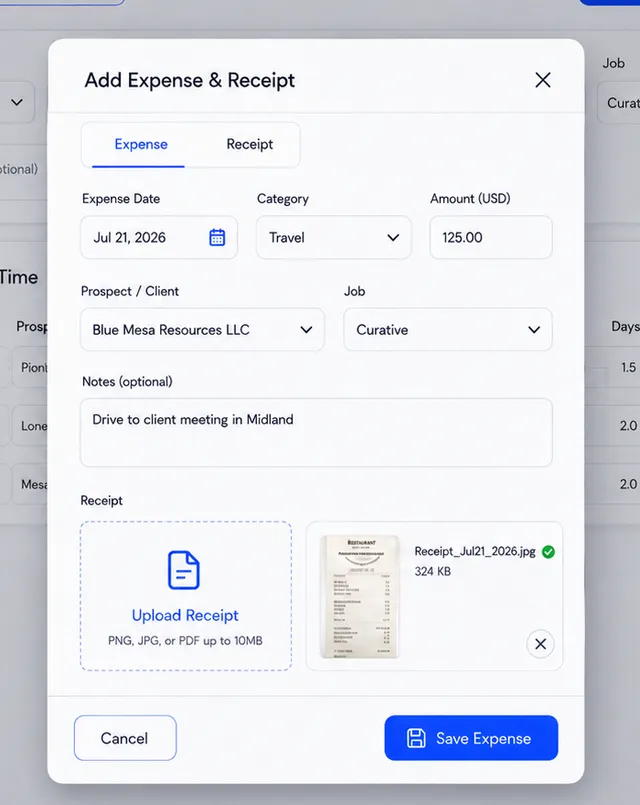
Landmen and staff can record time and expenses for their work and keep supporting receipts with the operational record. That activity remains available for review, invoicing, and reporting.
Review and follow-up
Land Agility connects the review work between activity capture and client invoicing.
Review submitted prospect activity before using it in client invoices and reports.
Follow up on outstanding work from the same operational workflow.
Review prospect, activity, and approval information without rebuilding the record elsewhere.
Synthetic sample data shown.
Prepare client delivery
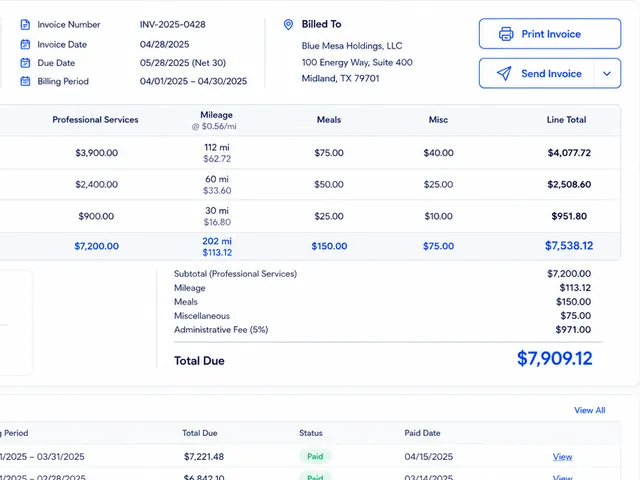
Use the time, expenses, and prospect activity already recorded in Land Agility when preparing client invoices and reports. Approval workflows provide a review step before that information moves on. If your brokerage calls that work a project, the Prospect record serves the same organizing role.
Prospects and assignments
Organize client work and assign landmen or staff.
Time, expenses, and receipts
Capture prospect activity and keep its supporting records together.
Legal descriptions
Keep prospect work connected to its legal-description details.
Approvals and follow-up
Review submitted activity and use automated reminders or alerts.
Client invoices and reporting
Prepare client invoices and operational reports.
